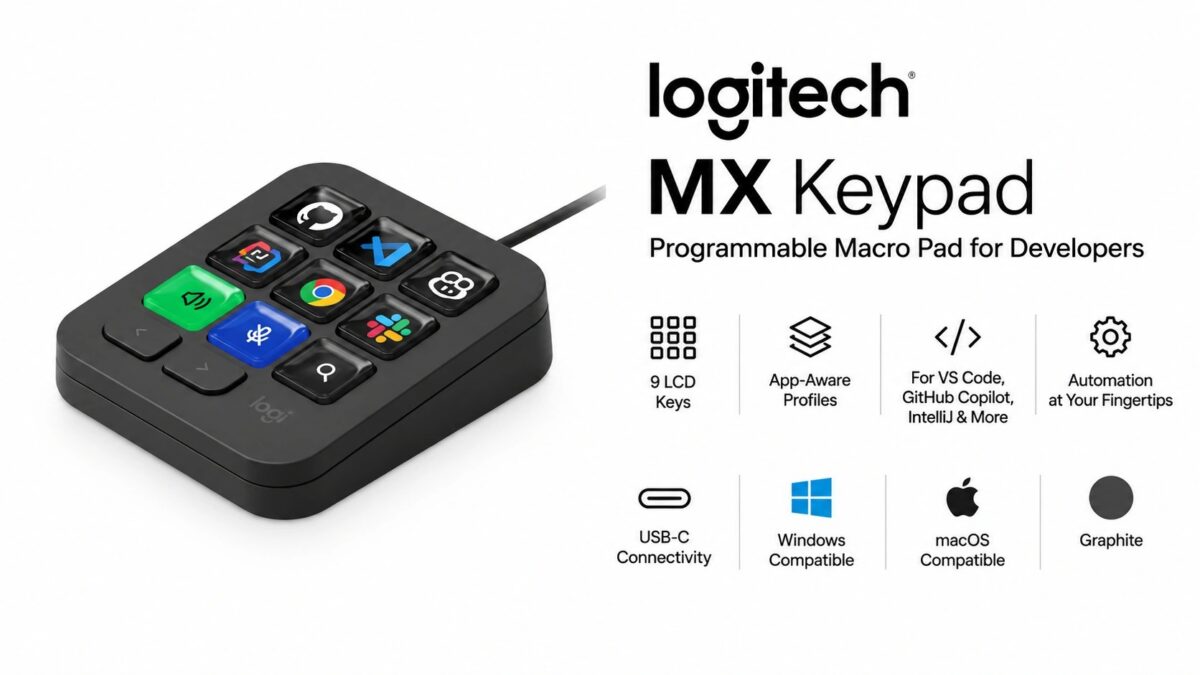
Logitech MX Keypad (920-013889) Programmable Macro Pad Launched in India – 9 Full-Colour LCD Keys, App-Aware Profiles, VS Code and GitHub Copilot Integration

Logitech’s MX Keypad Programmable Macro Pad (920-013889) is now available to purchase in India online. It is now listed online on Amazon.in at a launch selling price of Rs 12,995 (Lowest Price on September 7, 2026). The MRP price is Rs 15,995.

Key specs highlights include 9 customisable full-colour LCD keys, app-aware profiles that switch layouts automatically between applications, native plugins for VS Code, IntelliJ and GitHub Copilot, and a wired USB-C connection supported on Windows and macOS.

The unit is sold in a single Graphite colour.

Logitech MX Keypad for Developers 9 LCD Keys with 3 Months of GitHub Copilot Pro+, App-Aware Profiles for VS Code, IntelliJ, Automation, USB-C, Windows, macOS - Graphite -19%
Logitech
Sold by Clicktech Retail Private Ltd
₹12,995.00 Rs.15,999.00 -19%
Price last updated on: Sep 10, 2026 at 12:35 AM IST (1 hour ago)

What We Like About the Logitech MX Keypad (920-013889)

  • 9 full-colour LCD keys: each key renders its own icon, so the legend changes with the assigned action rather than staying fixed like a printed keycap
  • App-aware profile switching: the key layout changes on its own as the active application changes, with no manual profile selection
  • Native VS Code, IntelliJ and GitHub Copilot plugins: the integrations ship from Logitech rather than depending on user-written scripts
  • Logi Actions SDK: custom plugins can be built for applications that have no official integration
  • Three months of GitHub Copilot Pro+ included: Logitech bundles the subscription with purchase, redeemable by new and existing users subject to offer conditions

9 Programmable LCD Keys

The device carries 9 customisable LCD keys in place of printed keycaps. Because each key is a small colour display, its icon changes with whatever action is mapped to it, and Logitech allows the icons themselves to be customised.

Actions are assigned through a drag-and-drop interface, and can be organised across multiple key pages so a single physical layout holds more than nine commands. Custom toggles and macros are supported, and additional content is distributed through the Logi Marketplace. All of this runs through the Logi Options+ application.

App-Aware Profiles

The keypad is made in such a way that it can switch its key set as the active application changes.

Developer and AI Integrations

Native plugins are provided for VS Code, IntelliJ and GitHub Copilot. Logitech positions the device as an IDE controller, with keys able to navigate code and reach development tools directly.

Workflow automation covers running command sequences from a single key, including launching terminals, starting servers, running scripts and executing Git commands.

For applications without an official plugin, the Logi Actions SDK allows custom plugins to be built.

Beyond development tools, Logitech lists native controls for Spotify, Zoom and Adobe applications.

Connectivity and Platform Support

The MX Keypad is a wired device, connecting over the included USB-C cable.

There is no wireless mode listed for this model. Logitech states it works with recent versions of Windows and macOS, with the Logi Options+ app required for configuration.

Logitech MX Keypad (920-013889) Specifications / Technical Details

SpecificationDetails
ModelLogitech MX Keypad
Part Number920-013889
UPC097855208736
Keys9 customisable full-colour LCD keys
Key PagesMultiple pages supported per profile
ProfilesApp-aware, switches automatically by active application
Native IntegrationsVS Code, IntelliJ, GitHub Copilot, Spotify, Zoom, Adobe
CustomisationDrag-and-drop actions, custom macros, toggles, custom icons
Developer PlatformLogi Actions SDK for custom plugins
Content LibraryLogi Marketplace
ConnectionWired, USB-C (cable included)
Operating SystemsWindows, macOS (recent versions)
Required SoftwareLogi Options+
Bundled Offer3 months GitHub Copilot Pro+, subject to offer conditions
ColourGraphite
MRPRs 15,995

What’s in the Box

  • Logitech MX Keypad
  • USB-C cable

Related Blogs to Check out

Note: Specifications listed above are based on available information and may not be 100% accurate. Please visit the official Logitech website or Amazon product page to verify complete and up-to-date specifications before making a purchase decision.

Disclaimer: We strongly recommend reading verified purchase reviews before making any online purchase. Always buy from trusted sellers. Discounts are often based on MRP prices. As an Amazon Associate, we may earn a commission from qualifying purchases made through links on this blog.
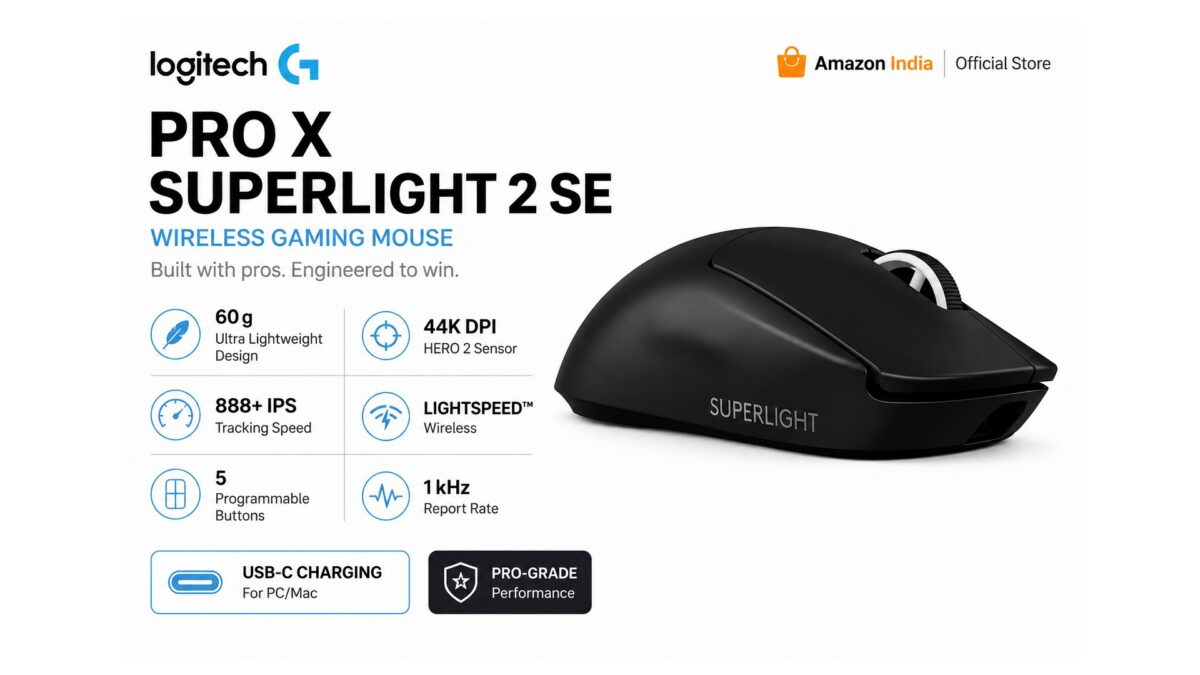
Logitech G PRO X Superlight 2 SE (910-007649) Launched in India – 44,000 DPI HERO 2 Sensor, LIGHTFORCE Switches, 88-Hour Battery

Logitech has launched the G PRO X Superlight 2 SE (910-007649) Wireless Gaming Mouse in India. This lightweight wireless gaming mouse is available at a launch price of Rs.8,995 (Lowest Price on August 22, 2026). The MRP price is Rs.19,075.

Key specs highlights include the HERO 2 sensor with a 100-44,000 DPI range, LIGHTFORCE hybrid optical-mechanical switches, LIGHTSPEED wireless with a 1000 Hz report rate, and a 60 g chassis with 88 hours of battery life.

The G PRO X Superlight 2 SE (910-007649) is the Black colour variant. Logitech lists the White version separately under part number 910-007657.

Pricing & Availability

ModelLaunch PriceLink
Logitech G PRO X Superlight 2 SE (910-007649), BlackRs.8,995Amazon India↗
Logitech G PRO X Superlight 2 SE Wireless Gaming Mouse, 60 g pro-Grade Mouse with 5 programmable Buttons, 44K DPI Sensor, 888+ IPS, 1 kHz Report Rate, USB-C Charging for PC/Mac - Black -56%
Logitech
Sold by Clicktech Retail Private Ltd
#64 in Gaming Mice
₹6,995.00 Rs.15,895.00 -56%
Price last updated on: Sep 10, 2026 at 1:45 AM IST (12 minutes ago)

What We Like About the Logitech G PRO X Superlight 2 SE (910-007649)

  • 60 g weight: among the lighter wireless shapes for extended play, with no weight-saving honeycomb shell
  • HERO 2 sensor at 100-44,000 DPI: Logitech states tracking runs with zero smoothing, acceleration or filtering across the range
  • LIGHTFORCE hybrid switches: optical actuation with a mechanical tactile click, rather than one or the other
  • 88-hour battery over LIGHTSPEED: covers several weeks of typical use between USB-C charges
  • 8 kHz report rate headroom: the PRO LIGHTSPEED receiver (sold separately) raises polling from 1 kHz to 8 kHz

HERO 2 Sensor and Tracking

Tracking is handled by Logitech’s HERO 2 sensor, with a resolution range of 100 to 44,000 DPI. Logitech states the sensor is calibrated without smoothing, acceleration or filtering applied to the input.

Maximum tracking speed is rated at more than 888 IPS and maximum acceleration at more than 88 G, both figures measured by Logitech on its own G640 gaming mouse pad.

LIGHTFORCE Switches and Buttons

The mouse carries 5 programmable buttons built on LIGHTFORCE hybrid optical-mechanical switches. According to Logitech, the design combines optical actuation with a tactile mechanical click, and the company positions it for low-latency input.

Onboard memory stores profiles on the mouse itself. Advanced configuration runs through Logitech G HUB, downloaded from logitechg.com/ghub.

LIGHTSPEED Wireless and Report Rate

Wireless connectivity uses LIGHTSPEED, running at a 1000 Hz (1 ms) wireless report rate out of the box. Wired USB data over USB-C runs at the same 1000 Hz.

Report rate can be raised to 8 kHz with the PRO LIGHTSPEED wireless receiver, which Logitech sells separately and does not include in this box. Processing is handled by a 32-bit ARM microprocessor.

Battery and Charging

Logitech rates the battery at 88 hours of constant motion, noting that figures vary with user and computing conditions. Charging is over USB-C, the same port used for wired data.

Design, Weight and Feet

The shell measures 125 mm long, 63.5 mm wide and 40 mm tall, at 60 g. Feet use an additive PTFE construction rather than separately applied PTFE skates.

On materials, Logitech states the Black unit uses a minimum of 70% post-consumer recycled plastic and the White unit a minimum of 62%. The company’s responsible packaging claim excludes cables, the receiver, the receiver extension adapter, the PWA and the packaging itself.

Logitech G PRO X Superlight 2 SE (910-007649) Specifications / Technical Details

SpecificationDetails
Model Number (Black)910-007649
Model Number (White)910-007657
UPC097855207326
SensorHERO 2
Resolution100-44,000 DPI
Max. Speed> 888 IPS (tested on Logitech G640)
Max. Acceleration> 88 G (tested on Logitech G640)
Buttons5 programmable
Button TechnologyLIGHTFORCE hybrid optical-mechanical
Onboard MemoryYes
Wireless TechnologyLIGHTSPEED
Wireless Report Rate1000 Hz (1 ms)
USB Report Rate1000 Hz (1 ms)
USB Data FormatUSB-C data/charging
Microprocessor32-bit ARM
Battery Life88 h constant motion
FeetAdditive PTFE
Length125 mm
Width63.5 mm
Height40 mm
Weight60 g
ColourBlack
CompatibilityPC with Windows 10 or later, USB 2.0 port
SoftwareLogitech G HUB (optional download)
Warranty2-year limited hardware warranty

System Requirements

A PC running Windows 10 or later with a USB 2.0 port is required. Internet access is optional and only needed to download Logitech G HUB, which is where the advanced features are configured.

Note: Specifications listed above are based on available information and may not be 100% accurate. Please visit the official Logitech website or Amazon product page to verify complete and up-to-date specifications before making a purchase decision.

Disclaimer: We strongly recommend reading verified purchase reviews before making any online purchase. Always buy from trusted sellers. Discounts are often based on MRP prices. As an Amazon Associate, we may earn a commission from qualifying purchases made through links on this blog.
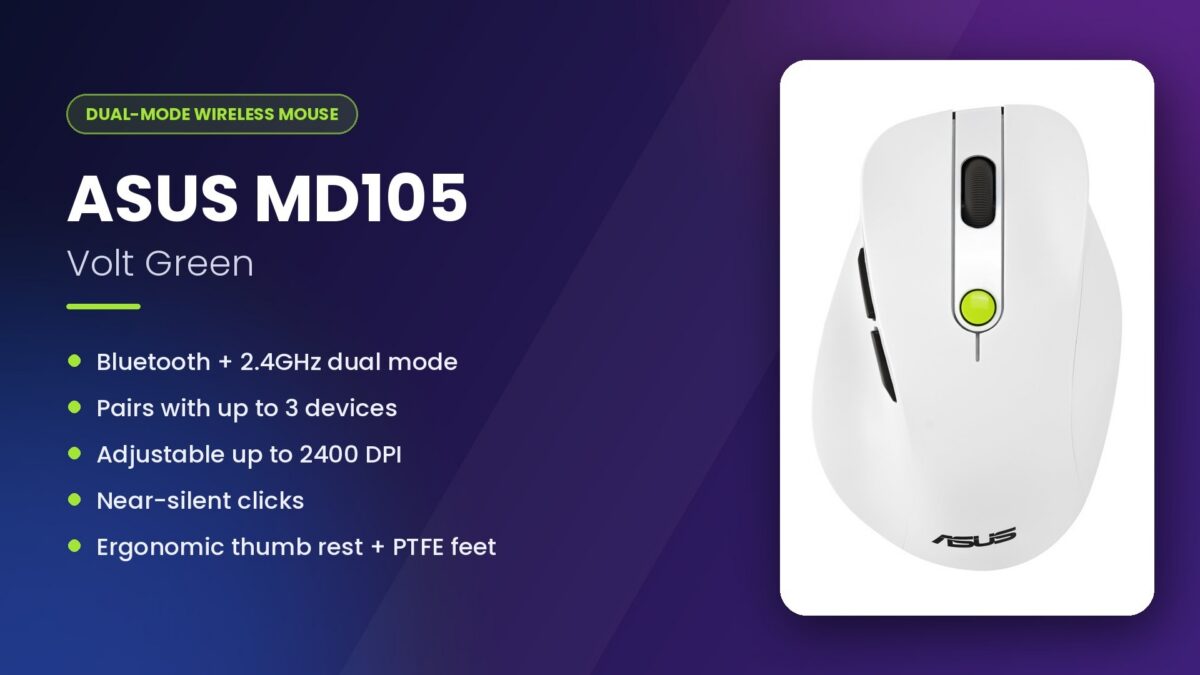
ASUS Wireless Mouse MD105 models ( 90XB0AH0-BMU010 / 90XB0AH0-BMU000 ) Launched in India

ASUS has launched the Wireless Mouse MD105 models ( 90XB0AH0-BMU010 / 90XB0AH0-BMU000 ) in India. This wireless mouse is available at a launch price of Rs.1,799 (Lowest Price on August 20, 2026). The MRP price is Rs.3,499.

Key specs highlights include dual-mode 2.4GHz and Bluetooth connectivity, adjustable DPI up to 2400, an ergonomic design with a built-in thumb rest, and support for up to three concurrent device connections.

The ASUS Wireless Mouse MD105 is available in 2 colour options: Volt Green (PN: 90XB0AH0-BMU010) and Milky White (90XB0AH0-BMU000).

What We Like About the ASUS Wireless Mouse MD105

  • Dual-mode 2.4GHz and Bluetooth connectivity: switches between up to three devices without needing separate receivers for each
  • Adjustable DPI (1200, 1600, 2400): gives some control over cursor sensitivity across different screen resolutions and surfaces
  • Built-in thumb rest with two side buttons: adds physical support and extra control points beyond the standard two-button layout
  • PTFE feet: reduces friction against the mouse surface for smoother glide
  • Near-silent clicks: aimed at shared or quiet work environments

Design and Build

The ASUS Wireless Mouse MD105 uses a curved shape aimed at all-day ergonomic comfort. A built-in thumb rest sits alongside two side buttons, and the mouse ships in two finishes: Volt Green and Milky White. PTFE feet are fitted underneath for gliding across surfaces, and ASUS states the click mechanism keeps noise low enough for shared or quiet spaces.

Connectivity and Sensor

The mouse supports both 2.4GHz wireless and Bluetooth, switching between up to three connected devices. DPI is adjustable across three settings: 1200, 1600, and 2400.

ASUS Wireless Mouse MD105 Specifications / Technical Details

SpecificationDetails
Model Numbers90XB0AH0-BMU010 (Volt Green), 90XB0AH0-BMU000 (Milky White)
Product TypeWireless Mouse
Connectivity2.4GHz Wireless, Bluetooth
Concurrent ConnectionsUp to 3
DPI Settings1200 / 1600 / 2400 (adjustable)
Buttons2 side buttons plus standard left/right/scroll
ErgonomicsBuilt-in thumb rest
FeetPTFE
Click NoiseNear-silent
ColoursVolt Green, Milky White

What’s in the Box

  • ASUS Wireless Mouse MD105
  • USB Wireless Receiver
  • Documentation / Quick Start Guide

Note: Specifications listed above are based on available information and may not be 100% accurate. Please visit the official ASUS website or Amazon product page to verify complete and up-to-date specifications before making a purchase decision.

Disclaimer: We strongly recommend reading verified purchase reviews before making any online purchase. Always buy from trusted sellers. Discounts are often based on MRP prices. As an Amazon Associate, we may earn a commission from qualifying purchases made through links on this blog.