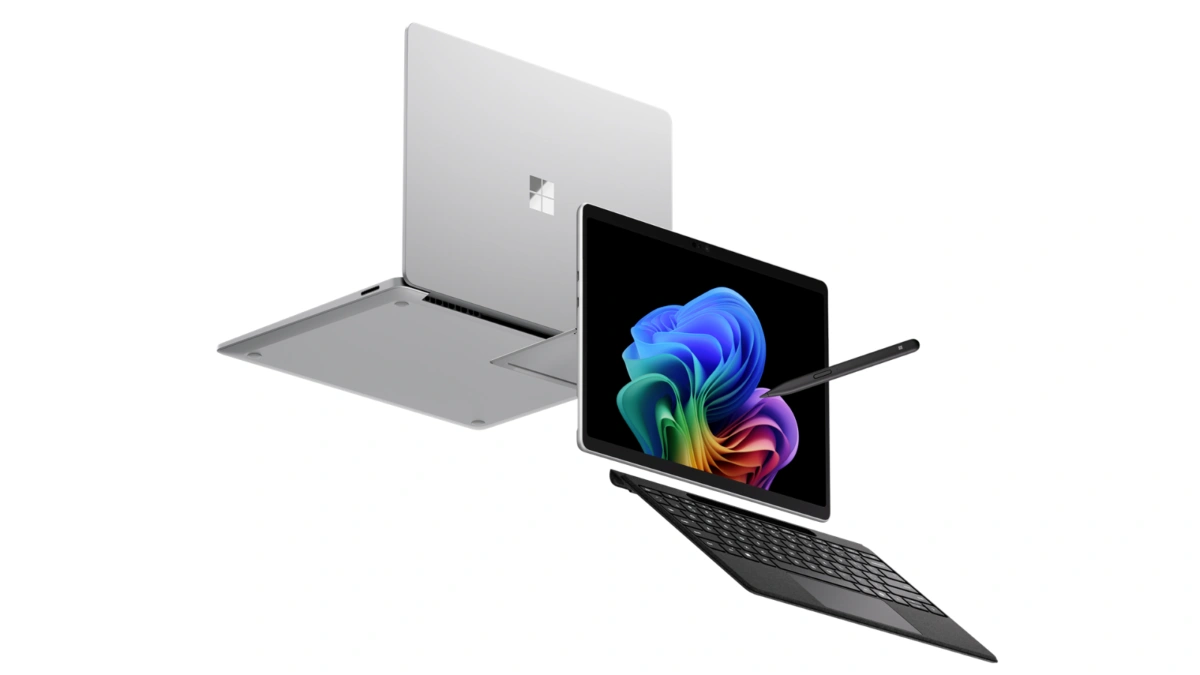
Microsoft has announced the next generation of its Surface for Business portfolio. The new Surface Pro for Business and Surface Laptop for Business are powered by Intel Core Ultra Series 3 and are available starting May 19, 2026 in select markets, with a Snapdragon X2 wave following later in the year.
Key additions include the Intel Core Ultra Series 3 platform, an optional integrated privacy screen with anti-glare on the 13.8-inch Surface Laptop for Business, a removable Gen 4 SSD on the new 13-inch Surface Laptop, and Wi-Fi 7 across the line. Microsoft is also positioning the lineup as the reference hardware for Windows AI APIs and the Foundry platform, with on-device inferencing as a first-class capability.
Pricing starts at $1,499 MSRP for the Surface Laptop for Business 13-inch (16GB), with the new Surface Pro for Business 13-inch and the 13.8-inch / 15-inch Surface Laptop for Business both starting at $1,949.99 MSRP.
| Variant | Launch Price | Link |
|---|---|---|
| EP2-66386 – X2 Plus, LCD, 16GB, 256GB, Platinum | $1,499.99 | Amazon US↗ |
| EP2-73249 – X2 Plus, LCD, 16GB, 512GB, Platinum | $1,599.99 | Amazon US↗ |
| EP2-73275 – X2 Plus, LCD, 16GB, 512GB, Black | $1,599.99 | Amazon US↗ |
| EP2-73301 – X2 Plus, LCD, 16GB, 512GB, Dune | $1,599.99 | Amazon US↗ |
| EP2-65013 – X2 Elite, OLED, 16GB, 1TB, Platinum | $2,099.99 | Amazon US↗ |
| EP2-65033 – X2 Elite, OLED, 16GB, 1TB, Dune | $2,099.99 | Amazon US↗ |


 -6%
-6%
 -16%
-8%
-16%
-8%
 -7%
-7%
Quick Links
Rollout Timing — What’s Live When
| Wave | When | What |
|---|---|---|
| Intel wave | May 19, 2026 (today) | Surface Pro for Business 13-inch, Surface Laptop for Business 13-inch, 13.8-inch, 15-inch on Intel Core Ultra Series 3 |
| 8GB Laptop 13-inch | Later in 2026 | Surface Laptop for Business 13-inch, 8GB configuration, starting at $1,299.99 MSRP |
| Snapdragon wave | Later in 2026 | Surface for Business models on Snapdragon X2 processors |
Devices are sold through Surface for Business and Microsoft authorized commercial resellers.
Surface Laptop for Business 13-inch — Entry-Premium Tier With Removable Gen 4 SSD
The new 13-inch model is the most portable Surface Laptop. It launches today in 16GB and 24GB configurations starting at $1,499 MSRP, with an 8GB configuration arriving later in the year at $1,299.99 MSRP.
What stands out for IT: a removable Gen 4 SSD designed for enterprise serviceability, Wi-Fi 7 (6 GHz band availability varies by region), and on-device AI processing. Microsoft is framing this as the model that brings the full Surface experience to the entry-premium tier without asking IT or employees to give up performance for portability.
Surface Laptop for Business 13.8-inch and 15-inch — Up to 23 Hours Battery, Haptic Touchpad
The 13.8-inch and 15-inch sizes start at $1,949.99 MSRP and ship today in select markets. Battery life is rated up to 23 hours based on local video playback.
The touchpad uses advanced haptics, with tactile feedback for window snapping, resizing, dragging, dropping, and navigation, and the feedback extends into select third-party apps. Display options include a high-resolution touchscreen and, on select configurations, the new optional integrated privacy screen detailed below.
Optional Integrated Privacy Screen With Anti-Glare — First on a Surface Device
For the first time on Surface, Microsoft is offering an optional integrated privacy screen with anti-glare, built directly into select configurations of the 13.8-inch Surface Laptop for Business display.
It’s a software-driven visual privacy filter — not a third-party physical screen protector. IT can manage it centrally, or an employee can toggle it with a single keystroke. Microsoft describes it as security-by-design, made possible by the tight integration of Surface hardware and software.
Surface Pro for Business 13-inch — 2-in-1 With Optional 5G
The new Surface Pro for Business 13-inch starts at $1,949.99 MSRP, available today in select markets. The 2-in-1 form factor supports touch, voice, pen, and keyboard input, with on-device AI processing alongside the Intel Core Ultra Series 3 platform.
There are 5G options for users who need cellular connectivity outside the office — availability depends on carrier network and region.
Intel Core Ultra Series 3 — Microsoft’s Performance Numbers
Microsoft cites two benchmark comparisons, both run in April 2026 using Cinebench 2024 Multi-Core on select Intel Core Ultra X7 configurations:
- Up to 35% more graphics performance than MacBook Air with M5 (10-core CPU, 13.5-inch)
- Up to 95% faster than Surface Laptop 5 15-inch with Intel Core i7; up to 93% faster than Surface Laptop 5 13.5-inch with Intel Core i7
Microsoft is pitching this as sustained, fluid GPU performance for tasks like analysis, presentations, and on-the-go content work — without trading off mobility, battery life, or security.
Snapdragon X2 Coming Later in 2026 — Up to 80% Faster Local AI Inferencing
The Intel wave isn’t the whole portfolio. Microsoft says it will extend Surface for Business later this year with models featuring Snapdragon X2 processors.
The headline number: up to 80% faster local AI inferencing than the previous Snapdragon-based Surface Laptop generation, measured with Procyon AI benchmark comparing the 8th-edition Surface Laptop (13.8-inch and 15-inch) with Snapdragon to the 7th edition. Microsoft is also calling out longer battery life on this wave, though performance varies by configuration.
Security — Secured-Core PCs, Memory-Safe Firmware, Rust-Based Drivers
Every new Surface for Business device ships as a Secured-core PC, with chip-to-cloud protection aligned with the Microsoft security stack. Firmware updates are delivered through Windows Update, with no third-party update tooling in the mix.
Microsoft is also calling out a deeper firmware change: Surface is the first PC built on memory-safe firmware through the open-source Project Mu and Open Device Partnership (ODP) UEFI, with Rust-based drivers and a secure embedded controller rooted in hardware-based protection. That’s framed as a direct response to one of the industry’s most persistent classes of vulnerabilities — memory-corruption bugs in firmware.
AI on the Edge — Microsoft’s Pitch
Surface for Business is positioned for hybrid AI: cloud when it makes sense, on-device when it doesn’t. Microsoft cites real-time meeting transcription, intelligent writing assistance, select on-device image generation, and live translation as scenarios that work whether the user is in a server room, on a plane, or in a hospital ward (some features require an internet connection, compatible hardware, or a Microsoft 365 subscription).
For developers, Surface is being positioned as the reference platform for Windows AI APIs and the Foundry platform — a consistent hardware baseline for teams building enterprise AI applications that need to offload everyday workloads from the cloud to the device.
Eric Sedore, AVP and CTO at Syracuse University, is quoted in the announcement: “Surface allows us to run AI where learning happens, on the device itself. The future of AI is not everything going to the cloud; it’s AI at the edge.”
IT Management — Intune, Autopilot, Surface Management Portal
From UEFI to browser, the whole portfolio can be managed through Microsoft Intune. Each device supports Windows Autopilot and the Surface Management Portal, giving IT a single plane for provisioning at scale, policy enforcement, and full lifecycle management, including zero-touch deployment.
Microsoft’s framing here is that when the hardware, OS, management platform, and productivity suite are all built and optimized by the same vendor, the operational story tightens — fewer integration seams, fewer third-party update channels.
Sustainability and Repairability — Recycled Aluminum, Replaceable Components
The Surface Laptop 13.8-inch, 15-inch, and Surface Pro 13-inch use 100% recycled aluminum in the enclosure (Pro 13-inch enclosure at 86% recycled content overall; Laptop 13.8-inch and 15-inch at 64%; both validated by Underwriter Laboratories using ECVP 2809-2). Magnets across these models use 100% recycled rare earth metals.
Each device is ENERGY STAR certified, outperforming the baseline by at least 45%. A new Automatic Keyboard Backlight setting on the 13-inch, 13.8-inch, and 15-inch Surface Laptop keyboards (and the Surface Pro 13-inch keyboard) helps reduce power use — note the feature isn’t supported with wireless detach on the Surface Pro 13-inch Flex Keyboard.
On repairability: nearly every major component is replaceable, with a parts supply chain for IT teams and a service guide that uses commonly available tools. Replacement components are available through Surface Commercial authorized device resellers. Repairs done outside the documented process aren’t covered under Microsoft’s Hardware Warranty.
FAQ / Common Questions
When does the new Surface for Business lineup go on sale?
The Intel Core Ultra Series 3 models — Surface Pro for Business 13-inch, Surface Laptop for Business 13-inch, 13.8-inch, and 15-inch — are available starting May 19, 2026 in select markets. The Snapdragon X2 models arrive later in 2026.
What is the starting price of the Surface Laptop for Business 13-inch?
It starts at $1,499 MSRP for the 16GB configuration. A 24GB option is also available today, and an 8GB configuration is coming later in 2026 at $1,299.99 MSRP.
How does the new integrated privacy screen work?
It’s a software-driven visual privacy filter built into select configurations of the 13.8-inch Surface Laptop for Business display. IT can manage it centrally, and employees can toggle it with a single keystroke — no separate physical screen protector required.
Does the Surface Pro for Business 13-inch support 5G?
Yes, 5G is offered as an option on the Surface Pro for Business 13-inch. Availability and performance depend on the carrier network, plan, and region.
Is on-device AI processing supported on these new Surface devices?
Yes. All new Surface for Business devices in this lineup support on-device AI processing. Microsoft is also positioning Surface as the reference platform for Windows AI APIs and the Foundry platform for developers building enterprise AI applications.
Will the Snapdragon X2 Surface for Business models replace the Intel versions?
No. Microsoft is shipping both. The Intel Core Ultra Series 3 models are available today, and the Snapdragon X2 models will join the same Surface for Business portfolio later in 2026.
Note: Details above are based on Microsoft’s announcement on May 19, 2026, and are subject to change. Final feature availability, pricing, rollout timing, and supported markets may vary by region. Verify against Microsoft’s official Surface for Business channels before relying on any specific detail.
Disclaimer: This post summarizes a Microsoft product announcement for informational purposes. It is not affiliated with or endorsed by Microsoft.
Source: Microsoft Blog.