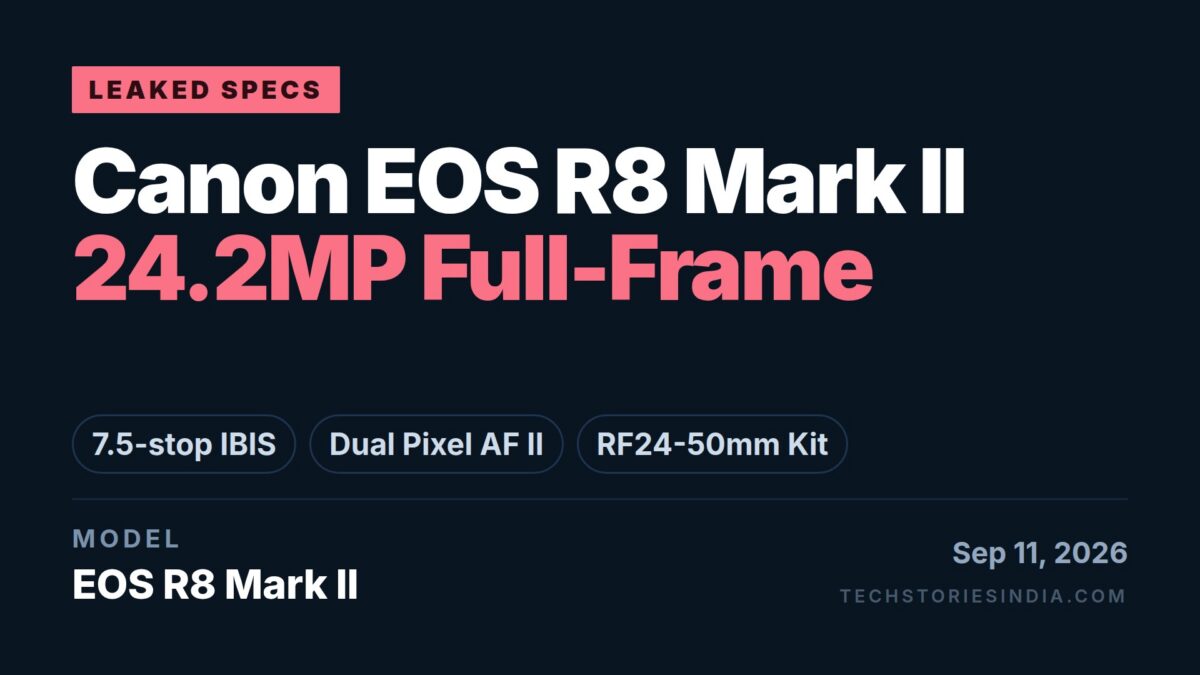
Product listings for the Canon EOS R8 Mark II have surfaced online in the US ahead of the official announcement, and they offer a glimpse at the specification of Canon’s next full-frame mirrorless body.
The headline claim is stabilisation: the EOS R8 Mark II is described as the lightest camera in the EOS lineup to carry In-Body Image Stabilization, rated at up to 7.5 stops of coordinated correction at the image centre. The first generation EOS R8 launched a while back didn’t have IBIS and relied on lens-based stabilisation, so this is the single biggest change between generations.
Canon EOS R8 Mark II will be available to pre-order as Body only, as well as with the RF24-50mm F4.5-6.3 IS STM lens kit.
24.2MP Full-Frame CMOS Sensor
Canon EOS R8 Mark II features a 24.2-megapixel full-frame CMOS sensor. Canon’s listing copy points to rich tonal reproduction, natural bokeh from the full-frame format, and high-ISO performance with low digital noise.
That resolution matches the outgoing EOS R8, so the sensor is likely a carry-over or a close revision rather than a new pixel count.
7.5 Stops of In-Body Image Stabilization
The IBIS unit is rated at up to 7.5 stops of coordinated shake correction at the image centre. Coordinated means the body and a stabilised lens work together rather than one or the other taking over, which is how Canon rates its higher-end RF bodies.
Two caveats sit in Canon’s own footnotes on that figure: the 7.5-stop rating applies at the centre of the frame, not across it, and stabilisation ratings are measured under standardised conditions rather than field use.
Dual Pixel CMOS AF II with Subject Detection
Autofocus system this model is equipped with is the Dual Pixel CMOS AF II, with subject detection covering People, Animal and Vehicle.
The listings also name Register People Priority Autofocus, the feature that lets a specific person be stored in the camera so it prioritises that face over others in a crowded frame.
Redesigned Flat-Surface Body
Canon describes a new compact and ergonomic design with a flat-surface treatment ( similar to Sony Alpha bodies ? ), a departure from the curved bodies of previous EOS models. The positioning is travel-oriented, aimed at aspiring photographers and enthusiasts rather than professionals.
Canon EOS R8 Mark II Leaked Specifications
Specification
Details
Sensor
Full-frame CMOS
Resolution
24.2 megapixels
Image Stabilisation
In-Body IS, up to 7.5 stops coordinated at image centre
Autofocus
Dual Pixel CMOS AF II
Subject Detection
People, Animal, Vehicle
AF Features
Register People Priority Autofocus
Body Design
New compact flat-surface design
Configurations
Body only; kit with RF24-50mm F4.5-6.3 IS STM
Note: Specifications listed above come from pre-launch product listings and have not been confirmed by Canon. Details may change before the camera is officially announced. Verify against Canon’s own channels once the announcement is made.
Apple has listed the 2026 AirPods 5 models ( MKFW4HN/A / MKFT4HN/A ) in India online for pre-order. The price starts at Rs.14,900 (Lowest Price on September 10, 2026) for the standard AirPods 5 with the USB-C Charging Case, with the AirPods 5 with Wireless Charging Case at Rs.17,900. Both are set for release on September 19, 2026.
Key specs highlights include the H2 headphone chip, improved Active Noise Cancellation with Adaptive Audio, Live Translation enabled by Apple Intelligence, Personalised Spatial Audio with dynamic head tracking, and an IP57 dust, sweat and water resistance rating.
At the time of writing, Amazon India has listed both models up for pre-order.
The earbuds themselves are identical across both models. Everything that differs sits in the case, and two of those differences change how the earbuds behave.
Feature
AirPods 5 (MKFW4HN/A)
AirPods 5 with Wireless Charging Case (MKFT4HN/A)
Launch price
Rs.14,900
Rs.17,900
Charging
USB-C only
USB-C, Apple Watch charger, Qi-certified chargers
Find My speaker in case
No
Yes
Volume swipe on stem
No
Yes (force sensor with volume swipe)
Battery, single charge with ANC
Up to 4 hours
Up to 5 hours
Total battery with case
Up to 20 hours
Up to 22 hours
Case weight with buds
32.3 g
34.7 g
The volume swipe is the one worth noting beyond charging convenience: only the Wireless Charging Case model lets you slide a finger up or down the stem to change volume. On the standard model, volume needs the phone or Siri.
H2 Chip and Audio
Both models run on the H2 headphone chip, driving a custom high-excursion Apple driver paired with a custom high-dynamic-range amplifier.
Adaptive EQ tunes output to the fit in each ear, and Apple lists studio-quality audio recording for capturing sound through the earbuds. A vent system handles pressure equalisation.
Active Noise Cancellation and Adaptive Audio
Apple describes the Active Noise Cancellation on AirPods 5 as improved over the previous generation. Adaptive Audio blends ANC with Transparency mode so the level of outside sound shifts with the environment rather than sitting at a fixed setting.
Conversation Awareness drops media volume automatically when it detects you have started speaking, and Voice Isolation applies computational audio to strip background noise out of your voice on calls.
Live Translation and Siri AI
Live Translation, enabled by Apple Intelligence, handles conversation across languages through the earbuds.
Apple also lists hands-free access to the updated Siri AI assistant on iPhone, covering open-ended questions, brainstorming and continuous conversation rather than single commands.
Personalised Spatial Audio
Personalised Spatial Audio with dynamic head tracking positions audio around the listener, holding the sound stage in place as the head moves. It applies to music, TV, films and games.
Sensors and Controls
Each earbud carries dual beamforming microphones, an inward-facing microphone, an optical in-ear sensor, a motion-detecting accelerometer, a speech-detecting accelerometer and a force sensor. The Wireless Charging Case model adds volume swipe to that force sensor.
Stem controls:
Press once to play or pause media
Press once to answer a call, or mute and unmute
Press once for camera remote
Press twice to end a call
Press twice to skip forward
Press three times to skip back
Press and hold to switch listening modes
Swipe up or down for volume (Wireless Charging Case model only)
Siri Interactions let you nod to accept or shake your head to decline when Siri asks about an incoming call, a text message or a notification.
Battery and Charging
The standard AirPods 5 run up to 4 hours on a charge with ANC on, and up to 20 hours total using the case. The Wireless Charging Case model runs up to 5 hours and up to 22 hours respectively.
Both charge fast: 5 minutes in the case gives around 1 hour of listening. The standard case takes USB-C only; the Wireless Charging Case works over USB-C, an Apple Watch charger or any Qi-certified charger, and has a built-in speaker for Find My.
Design and Durability
The open-ear design carries an IP57 rating for dust, sweat and water resistance.
Each earbud measures 30.2 × 18.3 × 18.1 mm and weighs 4.3 g. The case measures 46.2 × 50.1 × 21.2 mm.
Apple AirPods 5 (MKFW4HN/A / MKFT4HN/A) Specifications
Specification
Details
Models
AirPods 5 (MKFW4HN/A), AirPods 5 with Wireless Charging Case (MKFT4HN/A)
Chip
H2 headphone chip
Drivers
Custom high-excursion Apple driver
Amplifier
Custom high-dynamic-range amplifier
Noise Control
Active Noise Cancellation, Adaptive Audio, Transparency
Audio Features
Personalised Spatial Audio with dynamic head tracking, Adaptive EQ, Conversation Awareness, Voice Isolation, studio-quality audio recording
Translation
Live Translation via Apple Intelligence
Assistant
Siri AI, hands-free, with Siri Interactions
Microphones
Dual beamforming + inward-facing
Sensors
Optical in-ear, motion accelerometer, speech accelerometer, force sensor
Volume Swipe
Wireless Charging Case model only
Connectivity
Bluetooth 5.3
Ingress Protection
IP57
Earbud Dimensions
30.2 × 18.3 × 18.1 mm
Earbud Weight
4.3 g each
Case Dimensions
46.2 × 50.1 × 21.2 mm
Weight with Case
32.3 g (MKFW4HN/A), 34.7 g (MKFT4HN/A)
Battery, Single Charge (ANC on)
Up to 4 hours (MKFW4HN/A), up to 5 hours (MKFT4HN/A)
Battery with Case (ANC on)
Up to 20 hours (MKFW4HN/A), up to 22 hours (MKFT4HN/A)
Fast Charge
5 minutes for around 1 hour
Case Charging
USB-C (MKFW4HN/A); USB-C, Apple Watch charger, Qi (MKFT4HN/A)
Find My Speaker in Case
MKFT4HN/A only
Accessibility
Live Listen audio, Headphone levels, Headphone Accommodations
What’s in the Box
AirPods 5 (MKFW4HN/A)
AirPods 5
Charging Case (USB-C)
Documentation
AirPods 5 with Wireless Charging Case (MKFT4HN/A)
AirPods 5
Wireless Charging Case (USB-C) with speaker
Documentation
Note: Specifications listed above are based on available information and may not be 100% accurate. Please visit the official Apple website or Amazon product page to verify complete and up-to-date specifications before making a purchase decision.
Disclaimer: We strongly recommend reading verified purchase reviews before making any online purchase. Always buy from trusted sellers. Discounts are often based on MRP prices. As an Amazon Associate, we may earn a commission from qualifying purchases made through links on this blog.
Xiaomi has launched the Redmi 17 5G Android Smartphone in India. The price in India starts at Rs.23,999 (Lowest Price on September 10, 2026) for the 6GB + 128GB configuration, with the 8GB + 128GB configuration priced at Rs.26,999. The MRP price is Rs.39,999 and Rs.41,999 respectively.
Key specs highlights include the Qualcomm Snapdragon 4 Gen 5 processor on a 4nm process, a 7900mAh battery with 45W fast charging and the charger in the box, a 6.9-inch 120Hz adaptive display, and a 50MP AI dual camera behind an RGB ring light module.
The Redmi 17 5G is available in Absolute Black, Endless Blue and Eternal Orange.
Under the hood is the Snapdragon 4 Gen 5 Mobile Platform, built on a 4nm process. The octa-core layout pairs Cortex-A78 performance cores with Cortex-A55 efficiency cores at a maximum CPU frequency of 2.4GHz, and graphics run on an Adreno GPU.
Memory & Storage
India configurations cover 6GB + 128GB and 8GB + 128GB. Memory is LPDDR4X and storage is UFS 2.2.
Xiaomi’s memory extension feature borrows storage to add virtual RAM, taking the 8GB model to up to 16GB. Xiaomi notes the extension occupies a matching amount of ROM and only runs when free space allows. Storage is expandable by microSD card up to 2TB, with the card sold separately.
6.9-inch 120Hz Adaptive Display
The panel measures 6.9 inches (17.53 cm), with an adaptive refresh rate of up to 120Hz and a touch sampling rate of up to 240Hz. Brightness is rated at 825 nits in high brightness mode, and the screen is protected by Corning Gorilla Glass 7i.
Three TÜV Rheinland certifications apply: Low Blue Light (software solution), Circadian Friendly and Flicker Free. DC dimming and a reading mode are also supported.
50MP AI Dual Camera
The rear setup pairs a 50MP main camera on a 5P lens at f/1.8 with an auxiliary lens, and Xiaomi includes a flicker sensor. Rear shooting modes cover HDR, Night mode, Auto night mode, Portrait, Time-lapse, dual camera recording, Document mode and FilmCamera.
On the front is an 8MP f/2.05 camera with a soft-light ring, supporting HDR, Portrait, Night mode, Time-lapse and dual camera recording.
Video recording tops out at 1080p at 30fps on both the rear and front cameras.
7900mAh Battery with 45W Charging
The India model carries a 7900mAh battery with 45W fast charging, and Xiaomi includes the charger in the box for this market. 22.5W wired reverse charging is supported for topping up other devices, and the port is USB Type-C.
Audio
Dual stereo speakers tuned with Xiaomi Sound handle audio, and a 3.5mm headphone jack is fitted. FM radio works through wired headphones. Video playback supports High Efficiency Video Coding (HEVC).
Connectivity
The tray is a 3-in-2 hybrid arrangement taking two SIMs or one SIM plus a microSD card.
Indian band support covers 5G SA and NSA on n1/n3/n5/n8/n28/n40/n78, LTE FDD B1/3/5/8/28 and LTE TDD B40/41, WCDMA 1/5/8 and GSM 3/5/8. Wi-Fi covers 2.4GHz and 5GHz, and Bluetooth 5.1 handles short-range wireless. Positioning uses GPS, GLONASS, Galileo and BeiDou.
Design and Build
A new RGB ring light surrounds the camera module, which Xiaomi describes as a first for the Redmi Number Series. The body measures 170.12 × 78.42 × 8.8 mm and weighs 232g.
Ingress protection is rated IP64, covering splash and dust resistance under laboratory conditions rather than immersion.
Security
A side-mounted fingerprint sensor handles biometrics, alongside AI face unlock.
Software and Update Support
The phone runs Xiaomi HyperOS 3. Xiaomi commits to 4 years of OS updates and 6 years of security updates, which is a longer window than this price bracket usually gets.
Redmi 17 5G Specifications
Specification
Details
Model
Redmi 17 5G
Processor
Snapdragon 4 Gen 5 Mobile Platform, 4nm
CPU
Octa-core, Cortex-A78 + Cortex-A55, up to 2.4GHz
GPU
Adreno
RAM
6GB or 8GB LPDDR4X, up to 16GB with memory extension
Storage
128GB UFS 2.2, expandable to 2TB via microSD
Display Size
6.9 inches (17.53 cm)
Refresh Rate
Up to 120Hz adaptive
Touch Sampling Rate
Up to 240Hz
Brightness
825 nits HBM
Display Protection
Corning Gorilla Glass 7i
Display Certifications
TÜV Rheinland Low Blue Light, Circadian Friendly, Flicker Free
Note: Specifications listed above are based on available information and may not be 100% accurate. Please visit the official Xiaomi website or Amazon product page to verify complete and up-to-date specifications before making a purchase decision.
Disclaimer: We strongly recommend reading verified purchase reviews before making any online purchase. Always buy from trusted sellers. Discounts are often based on MRP prices. As an Amazon Associate, we may earn a commission from qualifying purchases made through links on this blog.
Vivo has listed the Y31t 5G on Amazon India across several RAM and storage configurations. The price starts at Rs.25,999 (Lowest Price on September 9, 2026) for the 4GB + 128GB configuration, with the 6GB + 128GB configuration at Rs.29,999. The MRP price is Rs.39,999 and Rs.44,999 respectively.
The phone runs OriginOS 6 on Android 16, and is sold in Crimson Red, Seashore Green and Golden Mist.
Key specs highlights include the Snapdragon 4 Gen 2 processor, a 7200mAh battery with 44W charging, IP68 and IP69 ingress protection, a 6.75-inch 120Hz display, and a 50MP rear camera with underwater photography support.
Price last updated on: Sep 20, 2026 at 1:43 AM IST (6 hours ago)
Snapdragon 4 Gen 2 Processor
Vivo Y31t 5G is powered by a Qualcomm Snapdragon 4 Gen 2 chipset, an 8-core chip built on a 4nm process. The core layout runs 2 cores at 2.2GHz alongside 6 cores at 1.95GHz.
Memory & Storage
Configurations cover 4GB + 128GB, 6GB + 128GB and 6GB + 256GB. Memory is LPDDR4X and storage is UFS 3.1.
Virtual RAM expansion of 4GB or 6GB is available through software. There is no microSD expansion for storage.
6.75-inch 120Hz LCD Display
It features a 6.75 inches (17.14 cm) display at an HD+ 1608 × 720 resolution. It is an LCD with capacitive multi-touch and a refresh rate of up to 120Hz, though vivo notes the 120Hz mode does not apply in every scenario.
Brightness is rated at 1250 nits in high brightness mode, with 83% NTSC colour gamut coverage.
7200mAh Battery with 44W Charging
The battery is a 7200mAh (typical) Li-ion cell, rated at 7060mAh. Charging runs at 44W through vivo’s FlashCharge, with the standard charger included in the box.
Cameras
The rear setup pairs a 50MP main camera at f/2.0 with a 2MP f/2.4 bokeh sensor, alongside a rear flash. On the front is an 8MP f/2.05 camera.
IP68 and IP69 Rated
The Y31t 5G carries both IP68 and IP69 ratings under IEC standard 60529, covering dust ingress, continuous water immersion, and high pressure and high temperature water jets.
Network and Connectivity
Two nano SIM slots are fitted, running Dual SIM Dual Standby. 5G bands cover n1/n3/n5/n8/n28B/n40/n77/n78, with 4G on FDD-LTE B1/B3/B5/B8/B28B and TD-LTE B38/B40/B41.
Wi-Fi runs on 2.4GHz and 5GHz, with Bluetooth 4.2, USB 2.0 over Type-C, and OTG support. Positioning covers GPS, BeiDou, GLONASS, Galileo and QZSS. There is no NFC and no FM radio.
Sensors
Accelerometer, ambient light sensor, proximity sensor, e-compass and gyroscope are all supported. A conventional vibration motor is fitted. There is no colour temperature sensor.
vivo Y31t 5G Specifications
Specification
Details
Model
vivo Y31t 5G
Operating System
OriginOS 6, Android 16
Processor
Snapdragon 4 Gen 2
CPU
8 cores, 2 × 2.2GHz + 6 × 1.95GHz
Process Node
4nm
RAM
4GB or 6GB LPDDR4X
Storage
128GB or 256GB UFS 3.1
Extended RAM
4GB or 6GB (software)
Storage Expansion
Not supported
Display Size
6.75 inches (17.14 cm)
Display Resolution
1608 × 720
Display Type
LCD, capacitive multi-touch
Refresh Rate
Up to 120Hz
Brightness
1250 nits (HBM)
Colour Gamut
83% NTSC
Rear Camera
50MP f/2.0 + 2MP f/2.4 bokeh, with flash
Front Camera
8MP f/2.05
Battery
7200mAh typical (7060mAh rated), Li-ion
Charging
44W FlashCharge
Ingress Protection
IP68 and IP69
SIM
2 nano SIM, Dual SIM Dual Standby
5G Bands
n1/n3/n5/n8/n28B/n40/n77/n78
Wi-Fi
2.4GHz / 5GHz
Bluetooth
4.2
USB
USB 2.0, Type-C
NFC
Not supported
FM Radio
Not supported
Positioning
GPS, BeiDou, GLONASS, Galileo, QZSS
Fingerprint Sensor
Side-mounted capacitive
Dimensions
166.64 × 78.43 × 8.39 mm
Weight
219g
Back Cover
Composite plastic sheet
Colours
Crimson Red, Seashore Green, Golden Mist
Country of Origin
India
What’s in the Box
vivo Y31t 5G
Charger
USB cable
Phone case
Protective film (pre-applied)
SIM eject tool
Quick start guide
Warranty card
Note: Specifications listed above are based on available information and may not be 100% accurate. Please visit the official vivo website or Amazon product page to verify complete and up-to-date specifications before making a purchase decision.
Disclaimer: We strongly recommend reading verified purchase reviews before making any online purchase. Always buy from trusted sellers. Discounts are often based on MRP prices. As an Amazon Associate, we may earn a commission from qualifying purchases made through links on this blog.
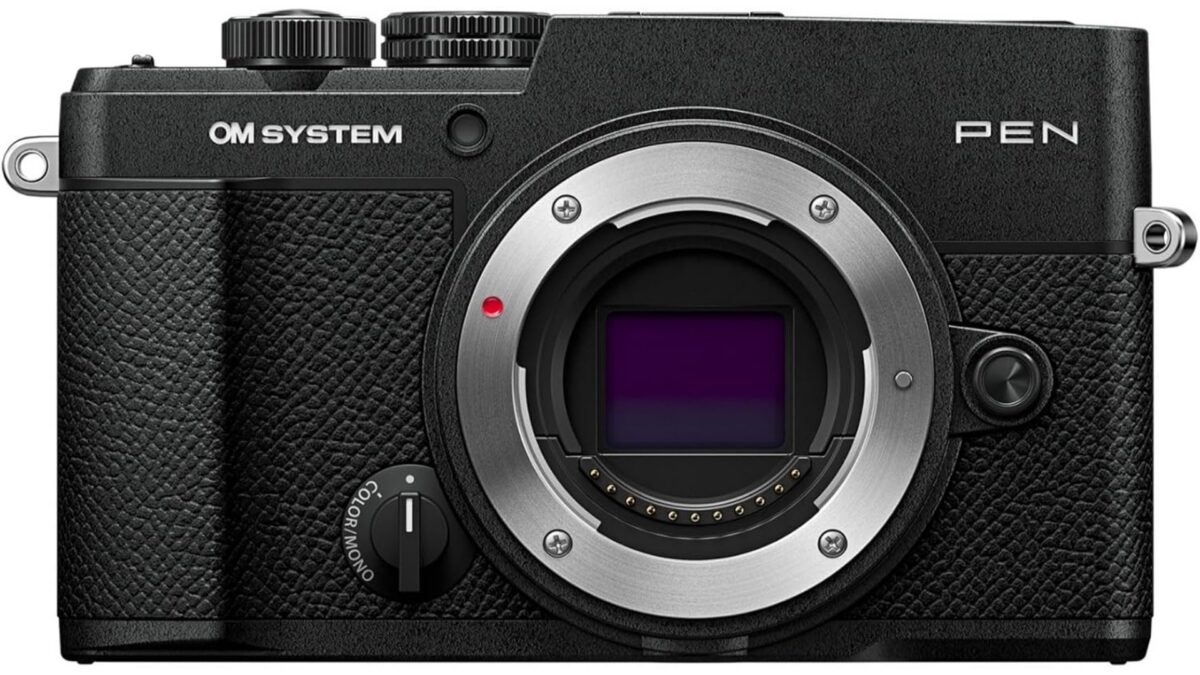
OM SYSTEM has announced the PEN, a compact rangefinder-style Micro Four Thirds mirrorless camera, and the full specifications and pricing are now official. Configurations are up for pre-order at retailers including Amazon US and B&H, in Silver or Black, with shipping to customers set for late October. The body sells for $999.99 USD ($1,399.99 CAD).
Key specs highlights include a 20.4MP Live MOS Four Thirds sensor with the TruePic IX processor, a 121-point all-cross-type phase-detection AF system with AI subject detection, 5-axis sensor-shift stabilisation rated at 5.5 EV steps, IPX1 weather sealing on a 393g body, and 4K 30p video with OM-Cinema profiles.
The camera carries a hardware Profile Control switch on the body, giving direct access to four colour and four monochrome film-style profiles, and a dedicated computational photography button for the in-camera Live ND, Live Composite, Focus Stacking, High Res Shot and HDR modes.
Pre-orders are open at Amazon US, B&H and other retailers, with shipping to customers set for late October. Availability of individual configurations varies by retailer.
What We Like About the OM SYSTEM PEN
All-cross-type phase-detection AF across 121 points: every point is cross-type rather than a mix of cross and line sensors, which holds focus on subjects with detail running in a single direction
Hardware Profile Control switch: colour and monochrome profiles get a physical control on the body rather than a menu dive, and custom recipes can be shared between cameras through OI.Share or OM Workspace
Five computational modes in-camera: Live ND, Live Composite, Focus Stacking, High Res Shot and HDR run on the TruePic IX processor, with Live ND and Live Composite previewing the result on screen as it builds
393g with battery and card, IPX1 sealed: a full-featured interchangeable-lens body under 400g that is rated against dripping water
5.5 EV steps of sensor-shift stabilisation: measured to the CIPA 2024 standard at the frame centre, with 4.5 steps at the corners
20.4MP Live MOS Sensor and TruePic IX Processor
At the centre is a 4/3-inch Live MOS sensor with 20.4 effective megapixels out of 21.8 total, measuring 17.3 × 13.0mm in a 4:3 ratio with a primary RGB colour filter. Processing runs on the TruePic IX engine.
Sensitivity spans ISO LOW 64 through ISO 25600 in manual mode, with auto ISO covering LOW 64 to 6400. Stills are recorded at up to 5184 × 3888 in JPEG or 12-bit RAW, with 4:3, 3:2, 16:9, 6:6 and 3:4 aspect ratios selectable.
Dust control is handled by the Supersonic Wave Filter, which vibrates over 30,000 times per second at power-on to shake particles off the sensor stack.
The AF system combines imager phase detection with contrast detection across 121 points, all of them cross-type. Working range runs from -3.5 EV to 20 EV at ISO 100 with an F2.8 lens, and an AF illuminator is fitted for low light.
Target modes cover all-target, single target in normal or small size, group targets at 5, 9 or 25 areas, and four custom target patterns. Focus modes run S-AF, C-AF, MF and the tracking variants, along with Starry Sky AF and Super Spot AF. C-AF tracking sensitivity is adjustable across five steps.
AI subject detection covers humans and pets. Face and eye detection AF is available in video recording mode.
Manual focus gets an enlarged focusing area, focus peaking with four colour choices and three intensity levels, and a focus indicator. A focus limiter can store up to three distance settings.
5-Axis Sensor-Shift Stabilisation, 5.5 EV Steps
Stabilisation is sensor-shift, correcting on five axes, with modes for automatic, vertical-only or horizontal-only activation. Compensation is rated at 5.5 steps at the frame centre and 4.5 steps at the corners, measured with the M.Zuiko Digital 14-42mm F3.5-5.6 III at 42mm to the CIPA 2024 standard. Lens IS priority and Live View stabilisation are both available.
Viewfinder and Vari-Angle Touch Monitor
The OLED electronic viewfinder carries 2.36M dots with approximately 100% coverage and magnification of roughly 1.10× to 1.23× depending on which of the three finder styles is selected. Diopter adjustment runs -4.0 to +2.0, and eye point is around 20.5mm.
The rear screen is a 3.0-inch vari-angle touch LCD at 1040K dots in a 3:2 ratio. Touch handles AF area selection and enlargement, the AF targeting pad, Art Filters, face and subject selection, magnified playback, menu control, movie controls, profile mode controls and shutter release.
Profile Control Switch, Colour and Monochrome Profiles
A dedicated Profile Control switch on the body moves between four colour profiles and four monochrome profiles, stored as COLOR1 to COLOR4 and MONO1 to MONO4.
Colour Profile Control adjusts saturation across 12 colours in 11 steps each, plus a shading effect over 11 steps, with highlight and shadow settings storable alongside. Monochrome Profile Control offers 8 colour filters at 3 levels, an 11-step shading effect, film grain at off, low, medium or high, and monochrome toning in normal, sepia, blue, purple or green.
Custom profile recipes can be exported and sent to other PEN users, who load them onto the camera through OM Workspace or the updated OI.Share app. Sixteen Art Filters sit alongside the profiles, with fine tuning available on five of them.
Computational Photography Modes
A dedicated computational photography button reaches the in-camera modes that would otherwise need filters, a tripod or post-processing.
Live ND: simulates ND2, ND4, ND8 and ND16 filters in S and M modes, with the effect shown live on screen before the shutter fires. ISO is capped at 800 and flash is unavailable in this mode
Live Composite: adds only new points of light to the frame as they appear, holding the base exposure steady for star trails, fireworks, traffic trails and light painting
Focus Stacking: combines frames shot at different focus distances into one image with front-to-back sharpness, across 3 to 999 shots at 10 step-size levels
High Res Shot: merges several frames for higher detail and lower noise, with tripod and handheld variants
HDR: bracketed capture across 3, 5 or 7 frames to hold detail in both highlights and shadows
Multiple Exposure: blends two frames, showing the first faintly on screen while the second is composed
4K Video, OM-Cinema Profiles and Vertical Recording
Video is recorded as MOV (MPEG-4 AVC / H.264). The top mode is C4K 4096 × 2160 at 24p at approximately 237 to 240 Mbps, with 4K 3840 × 2160 at 30p, 25p and 24p in IPB at around 102 Mbps. Full HD runs to 60p, with ALL-I available at 24p, 25p and 30p.
Picture modes for video cover Flat, OM-Log400, OM-Cinema1 and OM-Cinema2, the last two aimed at a graded look straight out of camera. Stabilisation offers M-IS1 and M-IS2 modes.
Slow & Quick (S&Q) capture runs to 120 fps, and time-lapse is available at 5, 10, 15 and 30 fps in 4K or Full HD. Vertical video is recorded in portrait orientation and transfers to a phone or computer already the right way up, and the camera works as a plug-and-play webcam over USB-C.
Audio uses built-in stereo microphones with wind noise reduction, recording volume control and a microphone volume limiter, plus a built-in mono speaker.
Continuous Shooting and Pro Capture
Mechanical shutter sequential shooting runs at approximately 5fps, selectable from 1 to 5fps, for up to 29 RAW or 154 large fine JPEG frames. Anti-shock mode runs at about 4.8fps.
Silent mode reaches approximately 30fps at the high setting and 8fps at low. Pro Capture also runs to approximately 30fps, buffering frames before the shutter is fully pressed, with focus and exposure fixed at the first frame and compatible lenses limited.
Body, Weather Sealing and Battery
The PEN uses a rangefinder-style body measuring 125.8 × 43.3 × 74.5mm, weighing 393g with battery and memory card, or 344g body only. Weather sealing is rated IPX1, covering dripping water.
Power comes from a BLS-7 lithium-ion battery, rated at approximately 410 shots to CIPA on either the EVF or the LCD, and around 80 minutes of video recording (approximately 130 minutes when zoom and other operational functions are not used). The battery charges in-camera over USB when the camera is off.
Operating temperature runs -10 to 40°C. The camera is offered in Black and Silver.
Connectivity and Storage
USB Type-C (USB 3), also used for webcam mode and battery charging
Micro HDMI (Type D)
3.5mm microphone jack with plug-in power
Hot shoe
SD / SDHC (UHS-I) / SDXC (UHS-I) card slot
Wireless covers Wi-Fi and Bluetooth Low Energy 5.2. Pairing uses a QR code, and OI.Share handles image transfer, GPS tagging from the phone, wireless release with half and full press, movie start and stop, and Live View remote shooting. Marked images can be imported automatically while the camera is powered off, with Bluetooth waking the Wi-Fi transfer.
Note: Specifications listed above are based on available information and may not be 100% accurate. Please visit the official OM SYSTEM website or Amazon product page to verify complete and up-to-date specifications before making a purchase decision.
Disclaimer: We strongly recommend reading verified purchase reviews before making any online purchase. Always buy from trusted sellers. Discounts are often based on MRP prices. As an Amazon Associate, we may earn a commission from qualifying purchases made through links on this blog.
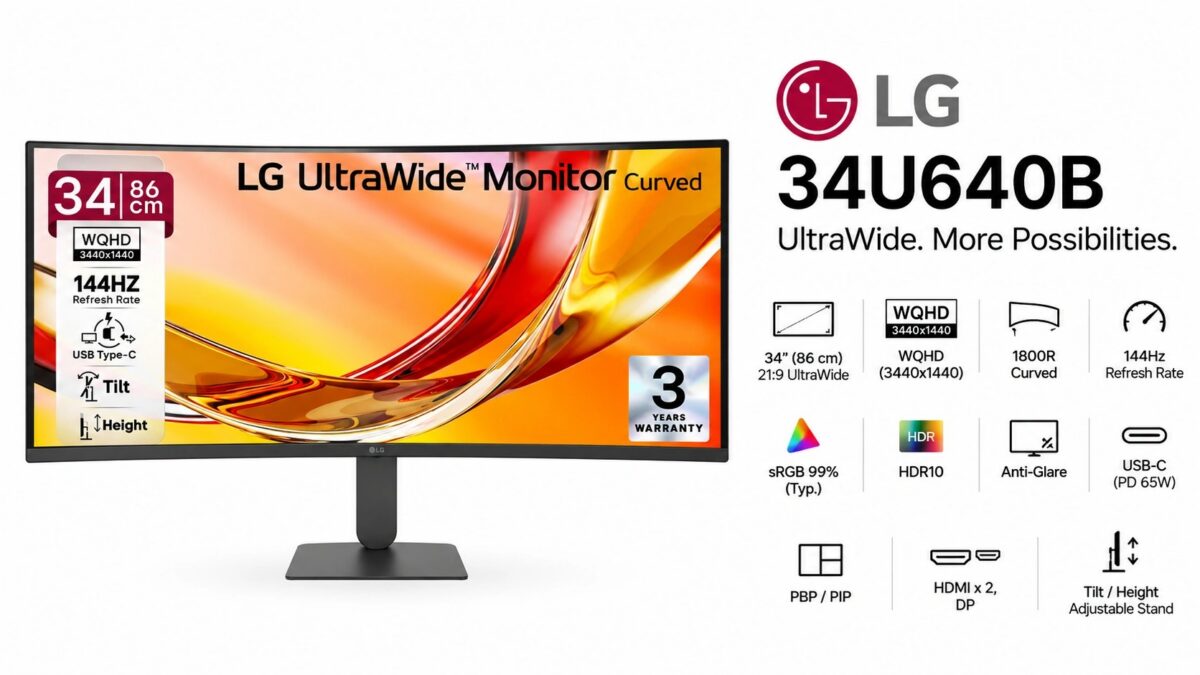
LG’s 2026 34U640B UltraWide Curved 144Hz Monitor variant is now available to purchase in India online, and is listed on Amazon at launch selling price of Rs.32,499 (Lowest Price on September 8, 2026). The MRP price is Rs.57,000.
Key specs highlights include a 34-inch 21:9 WQHD (3440×1440) VA panel with an 1800R curve, a 144Hz refresh rate, USB-C with 65W Power Delivery, and a Dual Controller KVM switch for running two PCs off one keyboard and mouse.
Price last updated on: Sep 20, 2026 at 12:58 AM IST (7 hours ago)
What We Like About the LG 34U640B
3440×1440 at 21:9: roughly 1.3× the horizontal working width of a standard 2560×1440 16:9 panel, so two full documents or app windows sit side by side without overlap
144Hz refresh rate: more than double the 60Hz a typical office monitor runs at, with AMD FreeSync Premium and VRR for variable-rate output
USB-C with 65W Power Delivery: carries display, data and laptop charging over one cable, so a notebook docks with a single connection
Dual Controller KVM: switches one keyboard and mouse between two connected PCs and supports drag-and-drop file transfer between them
Display
The LG 34U640B Monitor features a 34-inch VA panel with a native pixel resolution of 3440×1440 (WQHD) in a 21:9 aspect ratio, curved at 1800R.
Note: Specifications listed above are based on available information and may not be 100% accurate. Please visit the official LG website or Amazon product page to verify complete and up-to-date specifications before making a purchase decision.
Disclaimer: We strongly recommend reading verified purchase reviews before making any online purchase. Always buy from trusted sellers. Discounts are often based on MRP prices. As an Amazon Associate, we may earn a commission from qualifying purchases made through links on this blog.
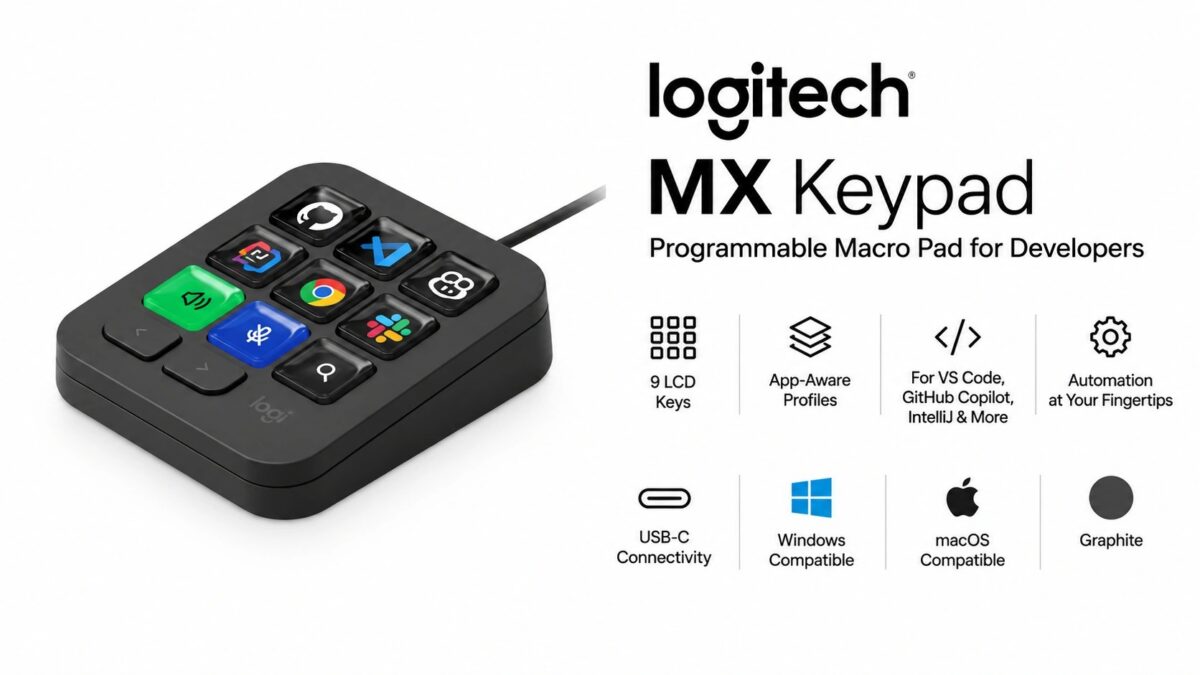
Logitech’s MX Keypad Programmable Macro Pad (920-013889) is now available to purchase in India online. It is now listed online on Amazon.in at a launch selling price of Rs 12,995 (Lowest Price on September 7, 2026). The MRP price is Rs 15,995.
Key specs highlights include 9 customisable full-colour LCD keys, app-aware profiles that switch layouts automatically between applications, native plugins for VS Code, IntelliJ and GitHub Copilot, and a wired USB-C connection supported on Windows and macOS.
Price last updated on: Sep 20, 2026 at 12:19 AM IST (7 hours ago)
What We Like About the Logitech MX Keypad (920-013889)
9 full-colour LCD keys: each key renders its own icon, so the legend changes with the assigned action rather than staying fixed like a printed keycap
App-aware profile switching: the key layout changes on its own as the active application changes, with no manual profile selection
Native VS Code, IntelliJ and GitHub Copilot plugins: the integrations ship from Logitech rather than depending on user-written scripts
Logi Actions SDK: custom plugins can be built for applications that have no official integration
Three months of GitHub Copilot Pro+ included: Logitech bundles the subscription with purchase, redeemable by new and existing users subject to offer conditions
9 Programmable LCD Keys
The device carries 9 customisable LCD keys in place of printed keycaps. Because each key is a small colour display, its icon changes with whatever action is mapped to it, and Logitech allows the icons themselves to be customised.
Actions are assigned through a drag-and-drop interface, and can be organised across multiple key pages so a single physical layout holds more than nine commands. Custom toggles and macros are supported, and additional content is distributed through the Logi Marketplace. All of this runs through the Logi Options+ application.
App-Aware Profiles
The keypad is made in such a way that it can switch its key set as the active application changes.
Developer and AI Integrations
Native plugins are provided for VS Code, IntelliJ and GitHub Copilot. Logitech positions the device as an IDE controller, with keys able to navigate code and reach development tools directly.
Workflow automation covers running command sequences from a single key, including launching terminals, starting servers, running scripts and executing Git commands.
For applications without an official plugin, the Logi Actions SDK allows custom plugins to be built.
Beyond development tools, Logitech lists native controls for Spotify, Zoom and Adobe applications.
Connectivity and Platform Support
The MX Keypad is a wired device, connecting over the included USB-C cable.
There is no wireless mode listed for this model. Logitech states it works with recent versions of Windows and macOS, with the Logi Options+ app required for configuration.
Note: Specifications listed above are based on available information and may not be 100% accurate. Please visit the official Logitech website or Amazon product page to verify complete and up-to-date specifications before making a purchase decision.
Disclaimer: We strongly recommend reading verified purchase reviews before making any online purchase. Always buy from trusted sellers. Discounts are often based on MRP prices. As an Amazon Associate, we may earn a commission from qualifying purchases made through links on this blog.
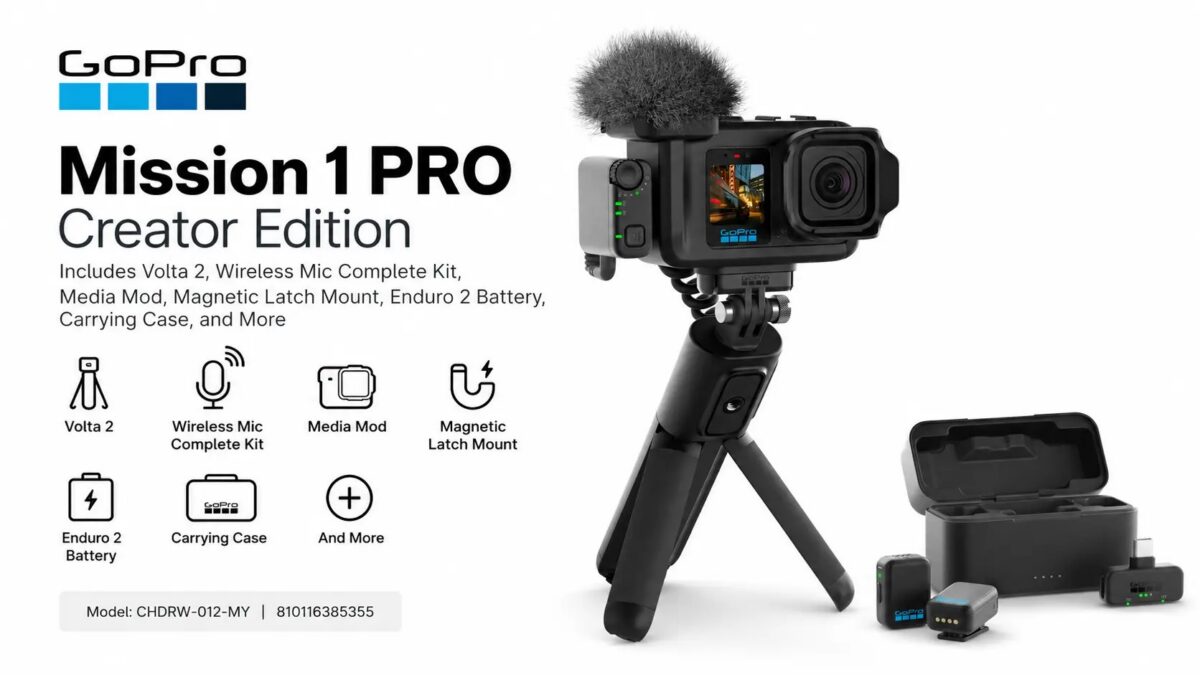
GoPro just got sold – but hasn’t stopped them from launching a new variant of their 2026 Action Camera – MISSION 1 PRO Creator Edition (CHDRW-012-MY) is now listed on Amazon US at starting price of $1,099.99 (Lowest Price on September 6, 2026). It bundles the MISSION 1 PRO camera with the accessories GoPro sells separately for the MISSION 1 line.
Key specs highlights include the 1-inch (1.0-type) image sensor, 8K video with Open Gate full-sensor capture, 50MP still photos with 44MP frame grabs, and a 2150mAh Enduro 2 battery paired with the Volta 2 grip that GoPro rates at over 9 hours of continuous 4K30 recording.
The kit also carries the Wireless Mic Complete Kit, the Media Mod for the MISSION 1 series, a Magnetic Latch Mount and a carrying case.
Price last updated on: Sep 19, 2026 at 3:08 AM EDT (19 hours ago)
What We Like About the GoPro MISSION 1 PRO Creator Edition (CHDRW-012-MY)
1-inch (1.0-type) sensor: physically larger than the sensors in most phones and many compact cameras – offering better image quality and low light performance.
8K capture with Open Gate: records the full sensor area rather than a cropped 16:9 window, leaving more room to reframe or crop in the edit.
50MP photos and 44MP frame grabs: stills can be pulled from 4:3 8K clips in the GoPro Quik app instead of being shot separately
Volta 2 grip plus 2150mAh Enduro 2 battery: GoPro quotes over 9 hours of continuous 4K30 recording from the pair, with rapid charging supported
Wireless Mic Complete Kit included in the box: the audio kit is a separate purchase alongside the standard MISSION 1 PRO – you get this with this bundle.
1-inch Sensor and Low-Light Capture
This 2026 GoPro camera features a 1-inch (1.0-type) sensor. It is larger than the sensors used in most mobile phones and some compact cameras ( point and shoot ), and that the extra sensor area produces less noise in low light. ( Sony’s RX100 Series of compact cameras use 1-inch type sensor as well as some of the new flagship Ultra smartphones from Chinese manufacturers. Apple iPhones and Google Pixel sensors are smaller than this. )
8K Open Gate Video
Video tops out at 8K, that’s 300% more resolution than 4K. The camera also offers Open Gate – which is the new trend among Camera manufacturers, which reads the full image sensor for maximum height and width instead of cropping to a delivery aspect ratio like 16:9 or 4:3.
50MP Photos and 44MP Frame Grabs
Stills are captured at up to 50MP in Single, Interval and Burst modes. GoPro includes an option that lets AI adjust settings automatically for night and low-light shots.
Separately, 44MP frame grabs can be pulled out of 4:3 8K video through the GoPro Quik app, so a still can come from footage already shot rather than from a dedicated photo.
Volta 2 Grip, Enduro 2 Battery and Runtime
The Creator Edition pairs the 2150mAh Enduro 2 battery with the Volta 2 grip. GoPro rates the combination at over 9 hours of continuous 4K30 recording, and offers improved heat management. Rapid charging is supported as well.
Note: Specifications listed above are based on available information and may not be 100% accurate. Please visit the official GoPro website or Amazon product page to verify complete and up-to-date specifications before making a purchase decision.
Disclaimer: We strongly recommend reading verified purchase reviews before making any online purchase. Always buy from trusted sellers. Discounts are often based on MRP prices. As an Amazon Associate, we may earn a commission from qualifying purchases made through links on this blog.
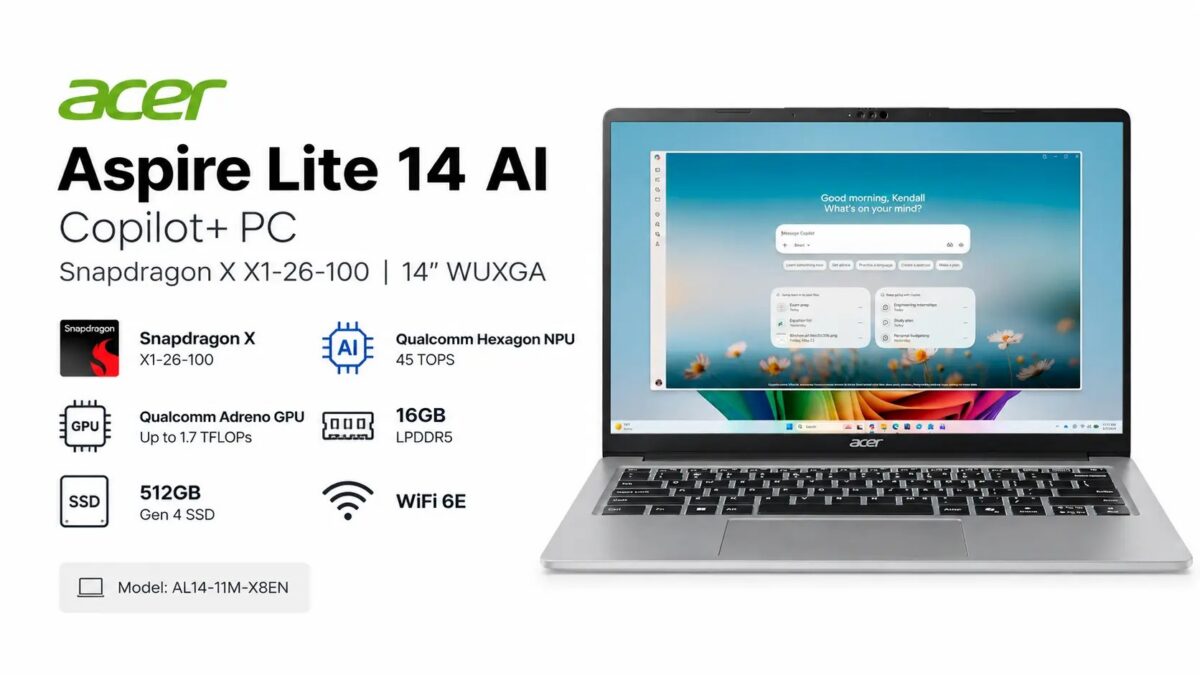
Acer’s Aspire Lite 14 AI Copilot+ PC (AL14-11M-X8EN / NX.DWNAA.001) is now listed on Amazon US as coming soon. The expected pre-order / launch price is $749.99.
Key specs highlights include the Snapdragon X X1-26-100 processor with a 45 TOPS Hexagon NPU, 16GB onboard LPDDR5 memory, a 512GB PCIe Gen 4 NVMe SSD, and a 14-inch WUXGA (1920×1200) IPS panel in a 16:10 aspect ratio.
The laptop ships in an Iron colour aluminium chassis and runs Windows 11 Home.
Price last updated on: Sep 19, 2026 at 3:08 AM EDT (19 hours ago)
What We Like About the Acer Aspire Lite 14 AI AL14-11M-X8EN
45 TOPS Qualcomm Hexagon NPU: clears the 40 TOPS floor Microsoft sets for Copilot+ features such as Recall, Cocreator and Live Captions translation
16GB LPDDR5 RAM
512GB PCIe Gen 4 NVMe SSD in an M.2 slot: Gen 4 rather than the Gen 3 drives
Two USB Type-C ports, both with 65W Power Delivery and DisplayPort output: either side can charge the laptop or drive an external display
1920×1200 at 16:10: 120 more vertical pixels than a 1920×1080 panel of the same diagonal
Snapdragon X X1-26-100 Processor and Copilot+ Requirements
Running the AL14-11M-X8EN is the Snapdragon X X1-26-100, an Arm-based chip with an eight-core Qualcomm Oryon CPU clocked at 3.0GHz and 30MB of total cache. Alongside it sit a Qualcomm Adreno GPU rated by Qualcomm at up to 1.7 TFLOPs and a Qualcomm Hexagon NPU rated at 45 TOPS.
Because the processor is Arm-based, x86 applications run through Windows on Arm emulation rather than natively.
Note: Acer US website listing for Aspire Lite AL14-11M-X8EN | NX.DWNAA.001 has listed this to have Snapdragon X1-26-101 processor as well as says it has Gigabit Ethernet. We think those are wrong info on Acer’s part. The specs on Amazon looks more accurate.
14-inch WUXGA IPS Display
The panel measures 14 inches diagonally and runs at 1920 x 1200 on a 16:10 aspect ratio, using an active matrix TFT LCD with IPS technology. Refresh rate is a standard 60Hz, and the surface is anti-glare with Acer’s ComfyView matte treatment. The maximum brightness supported is 300nits.
Colour coverage is quoted at 45% NTSC, which places it in the standard-gamut bracket rather than the wide-gamut one. The screen is not a touchscreen.
16GB LPDDR5 Memory and 512GB Gen 4 Storage
Memory is 16GB of LPDDR5, soldered onboard ( not upgradable ). Storage is a 512GB solid state drive on a PCI Express NVMe 4.0 interface in an M.2 form factor.
A microSD card reader slot is available on this model.
Ports and Wireless
Four USB ports are spread across the chassis, two of them Type-C:
Port
Specification
USB Type-C
USB4 up to 20 Gbps, DisplayPort over USB-C, USB Charging, Power Delivery up to 65W
USB Type-C
USB 3.2 Gen 2 up to 10 Gbps, DisplayPort over USB-C, USB Charging, Power Delivery up to 65W
USB Type-A
2 x USB 3.2 Gen 1
HDMI
HDMI 1.4 with HDCP support
Audio
Headphone / speaker / line-out combo jack
Card reader
microSD
Wireless is handled by Wi-Fi 6E (IEEE 802.11ax) on a Qualcomm WCN6856_NFA765_DBS module. There is no DisplayPort or DVI connector on the body, with external display output going through the two USB-C ports and HDMI instead.
Battery, Chassis and Input
Acer quotes up to 15 hours of battery life from the three-cell pack, measured on web browsing tests, with a 65W power adapter supplied. The aluminium chassis measures 12.35 inches wide x 8.78 inches deep x 0.65 inches high and weighs about 3.31 lb, and the hinge opens flat to 180 degrees.
The keyboard includes a dedicated Copilot key but has no backlight and no numeric pad. Two speakers and a microphone are built in. There is no fingerprint reader on this configuration.
Acer Aspire Lite 14 AI AL14-11M-X8EN Specifications / Technical Details
Specification
Details
Model
Acer Aspire Lite 14 AI AL14-11M-X8EN
Part Number
NX.DWNAA.001
UPC
195133362030
Operating System
Windows 11 Home, 64-bit
Processor
Qualcomm Snapdragon X X1-26-100
CPU Cores
Octa-core Qualcomm Oryon, 3.0GHz
Cache
30MB total
GPU
Qualcomm Adreno, up to 1.7 TFLOPs
NPU
Qualcomm Hexagon, 45 TOPS
Memory
16GB LPDDR5, onboard
Storage
512GB PCIe NVMe 4.0 SSD, M.2
Card Reader
microSD
Display Size
14 inches
Resolution
1920 x 1200 (WUXGA)
Panel
Active matrix TFT LCD, IPS
Aspect Ratio
16:10
Refresh Rate
60Hz
Display Features
Anti-glare, ComfyView matte, 45% to 48.5% NTSC, 300nits brightness
Touchscreen
No
Wireless LAN
IEEE 802.11ax (Wi-Fi 6E), WCN6856_NFA765_DBS
USB-C Ports
1 x USB4 20Gbps, 1 x USB 3.2 Gen 2 10Gbps, both DP Alt Mode and 65W PD
Note: Specifications listed above are based on available information and may not be 100% accurate. Please visit the official Acer website or Amazon product page to verify complete and up-to-date specifications before making a purchase decision.
Disclaimer: We strongly recommend reading verified purchase reviews before making any online purchase. Always buy from trusted sellers. Discounts are often based on MRP prices. As an Amazon Associate, we may earn a commission from qualifying purchases made through links on this blog.
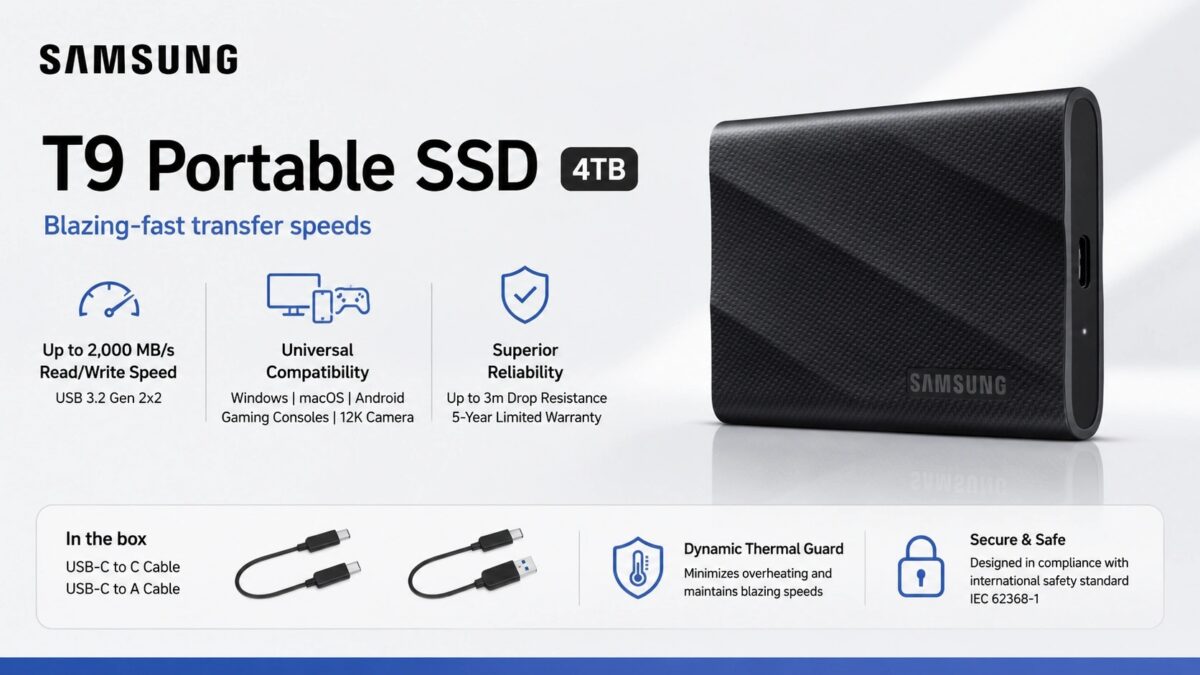
Samsung’s T9 Portable External SSD 4TB (MU-PG4T0B/W) is now available to purchase in India online, and is listed on Amazon at launch selling price of Rs.1,16,799 (Lowest Price on September 3, 2026). The MRP price is Rs.1,63,499.
Key specs highlights include a USB 3.2 Gen 2×2 (20Gbps) interface, sequential read and write speeds of up to 2,000 MB/s, AES 256-bit hardware encryption, and a 3-metre drop rating on a 122 gram enclosure.
The T9 is sold in Black and carries a five-year limited warranty.
Price last updated on: Sep 20, 2026 at 1:14 AM IST (6 hours ago)
What We Like About the Samsung T9 Portable External SSD 4TB (MU-PG4T0B/W)
2,000 MB/s in both directions: the write figure matches the read figure, rather than the lower sustained write common on portable drives
USB 3.2 Gen 2×2 at 20Gbps: double the 10Gbps ceiling of Gen 2×1, which is what the 2,000 MB/s rating needs to be reachable
AES 256-bit hardware encryption: handled on the drive rather than in software, so it does not consume host CPU cycles
3-metre drop rating at 122 grams: rated for drops in an 88 x 60 x 14 mm enclosure
Five-year limited warranty: covers the drive for longer than the three years typical of portable SSDs
Interface & Transfer Speeds
The T9 connects over USB 3.2 Gen 2×2, rated at 20Gbps. Samsung quotes sequential reads of up to 2,000 MB/s and sequential writes of up to 2,000 MB/s, and states the drive holds high speeds through longer transfers rather than only in short bursts. UASP mode is supported.
Reaching the full 20Gbps requires a host port that also supports USB 3.2 Gen 2×2. On a 10Gbps Gen 2×1 port the drive still works, at that port’s lower ceiling.
Capacity & Compatibility
Rated capacity is 4TB, counted by Samsung as 1TB = 1,000,000,000,000 bytes, so the figure reported by an operating system will read lower.
Samsung lists compatibility with PCs, laptops, Android smartphones and tablets, game consoles, smart TVs and cameras, across Windows, macOS and Android, including cameras shooting up to 12K.
Encryption & Software
Security is handled by AES 256-bit hardware encryption. Samsung Magician software manages the drive, covering firmware updates, encryption setup and drive health monitoring.
Thermal & Durability
Samsung fits what it calls Dynamic Thermal Guard, which the company states controls heat to hold the drive at its intended operating temperature during heavy use. The drive is rated to withstand drops of up to 3 metres.
Operating temperature range is 0°C to 60°C, with a non-operating range of -40°C to 85°C. Samsung states the drive is designed in compliance with international safety standard IEC 62368-1.
Note: Specifications listed above are based on available information and may not be 100% accurate. Please visit the official Samsung website or Amazon product page to verify complete and up-to-date specifications before making a purchase decision.
Disclaimer: We strongly recommend reading verified purchase reviews before making any online purchase. Always buy from trusted sellers. Discounts are often based on MRP prices. As an Amazon Associate, we may earn a commission from qualifying purchases made through links on this blog.